Detailed Integration Process & Flowcharts
User mapping supports two entry scenarios. In both cases, the structure ultimately sends your user key (partnerUid) and a one-time mapping token (token) to the Unifi server to complete the mapping and then records the mission achievement.
Scenario A: Entry from Unifi → Service App
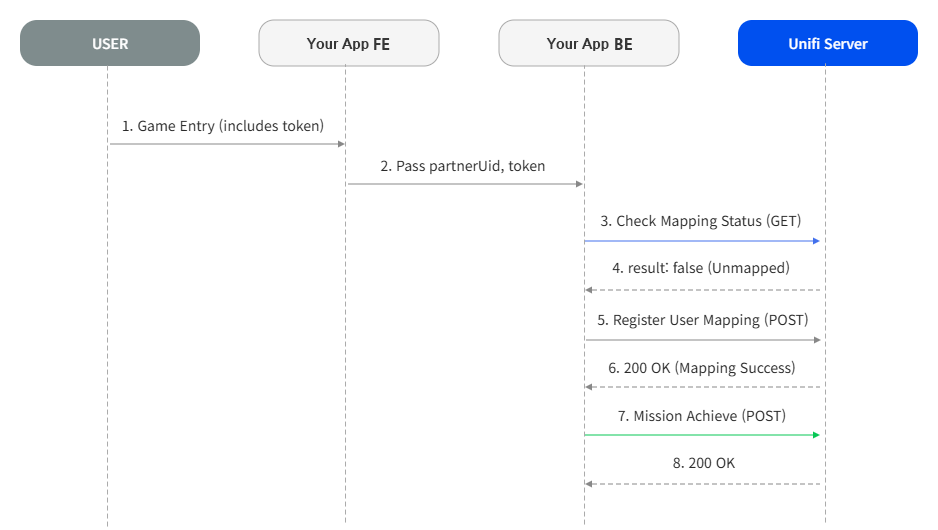
- App Entry & Token Reception: When a user clicks a service mission in Unifi, they are redirected to the service page. A one-time token is passed as a URL Query Parameter.
Example:https://miniapp.line.me/{Service_App_ID}/...?token={mapping_token} - Check User Mapping Status: Upon service entry, check if the user is already connected to a Unifi account based on your user identifier (
partnerUid). (Refer to Check User Mapping Status) - Request User Mapping Registration (If Unmapped): If not connected, send the received token and partnerUid to the Unifi server to register the mapping. (Refer to Register User Mapping)
- Mission Achievement Request: If the user is mapped, include your user key in the Mission Achievement API call to process the mission completion.
Scenario B: Service App → Unifi Login for Mapping
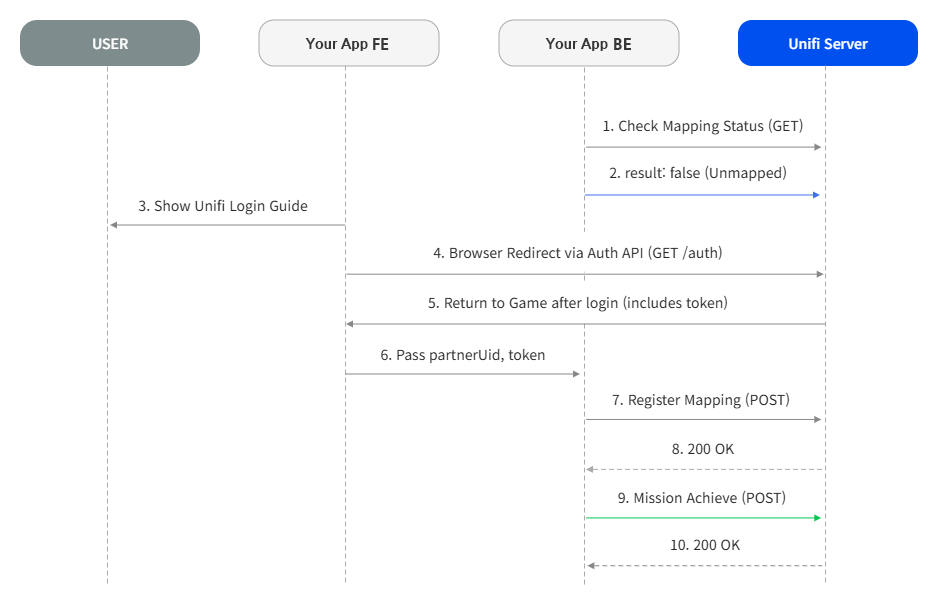
- Check Mapping Status: Check the user's Unifi mapping status from within the service. (Refer to Check User Mapping Status)
- Unifi Login Guide: If unmapped, show a prompt (popup, etc.) indicating that Unifi login is required to perform missions.
- Enter Unifi Login (Auth API Browser Redirect): The frontend (FE) directly navigates the browser screen to the Unifi server Auth Endpoint. The URL must include your partnerId, browserType, and the final destination
redirectUrlto return to after login.
Preview:https://app-api-reward.unifi.me/v1/mission-users/auth?partnerId={partnerId}&browserType={browserType}&redirectUrl={URL Encoded redirectUrl}
Prod:https://api-reward.unifi.me/v1/mission-users/auth?partnerId={partnerId}&browserType={browserType}&redirectUrl={URL Encoded redirectUrl} - Return to Service App after Login: Once Unifi login is complete, the Unifi server will append a one-time mapping token (
token=) to your redirectUrl and return the user.
Return URL Format:https://miniapp.line.me/{Service_App_ID}/{path}?myParam=xyz&token={mapping_token} - Register Mapping & Mission Achieve: Using the token received via URL parameters upon return, register the mapping (Refer to Register User Mapping) and call the mission achievement API, identical to Scenario A.
warning
Auth API Frontend Calling Method (Scenario B)
The /auth API internally constructs a LINE LIFF login URL and returns a 302 Redirect response. Therefore, if you call it via fetch or axios, the user's screen will not transition to the login page. You must navigate via the browser's window.location.href using template literals.
const redirectUrl = encodeURIComponent('https://miniapp.line.me/{Service_App_ID}/{path}?myParam=xyz');
window.location.href = `https://api-reward.unifi.me/v1/mission-users/auth?partnerId=${partnerId}&browserType=${browserType}&redirectUrl=${redirectUrl}`;