Setup & Prerequisites
Prerequisite for Server Firewall Settings
Before proceeding with the integration, the following firewall setup and authentication key configuration must be completed on the backend to ensure proper communication and API calls (user mapping check, registration, mission achieve, etc.) with the Unifi server.
- Server IP Registration (Firewall Open): To allow your service server to call APIs to the Unifi server, your IP must be whitelisted on Unifi's firewall. Please provide all Outbound IP addresses of the service server to the Unifi representative before starting the integration.
- Authentication Key Setup: You must obtain the
X-Partner-IdandX-Api-Keyfrom the Unifi representative in advance and set them in your backend environment variables to include in the request headers for API calls.
Pre-delivery Information for Unifi System Registration
To expose your service on the Unifi mission and reward system, you must organize and deliver the following planning information and assets to the Unifi representative before integration development.
Partner (Service Publisher) Basic Information
- Main URL: The main website address of your company or the service.
- Logo Image: 420 × 420 pixels. An image that represents the Partner.
- Screenshot Images: 600 × 1296 pixels (up to 7 images). Images that showcase the Partner, shown in the Preview area of the mission page.
- Multilingual Partner Name: English (EN) is mandatory; other languages are optional.
- Multilingual Partner Title (Short Desc): A short introduction to the Partner. Must provide in 5 languages (EN, KR, JA, TH, TW).
- Multilingual Partner Detailed Description: Any additional information you would like users to know about the Partner. Must provide in 5 languages (EN, KR, JA, TH, TW).
- Official Social Channels (OA): Links to official social channels (LINE, X, Facebook, Discord, Instagram, Medium).
- Tag: Keywords associated with your service (e.g.
#puzzle,#RPG), shown alongside the Partner description.
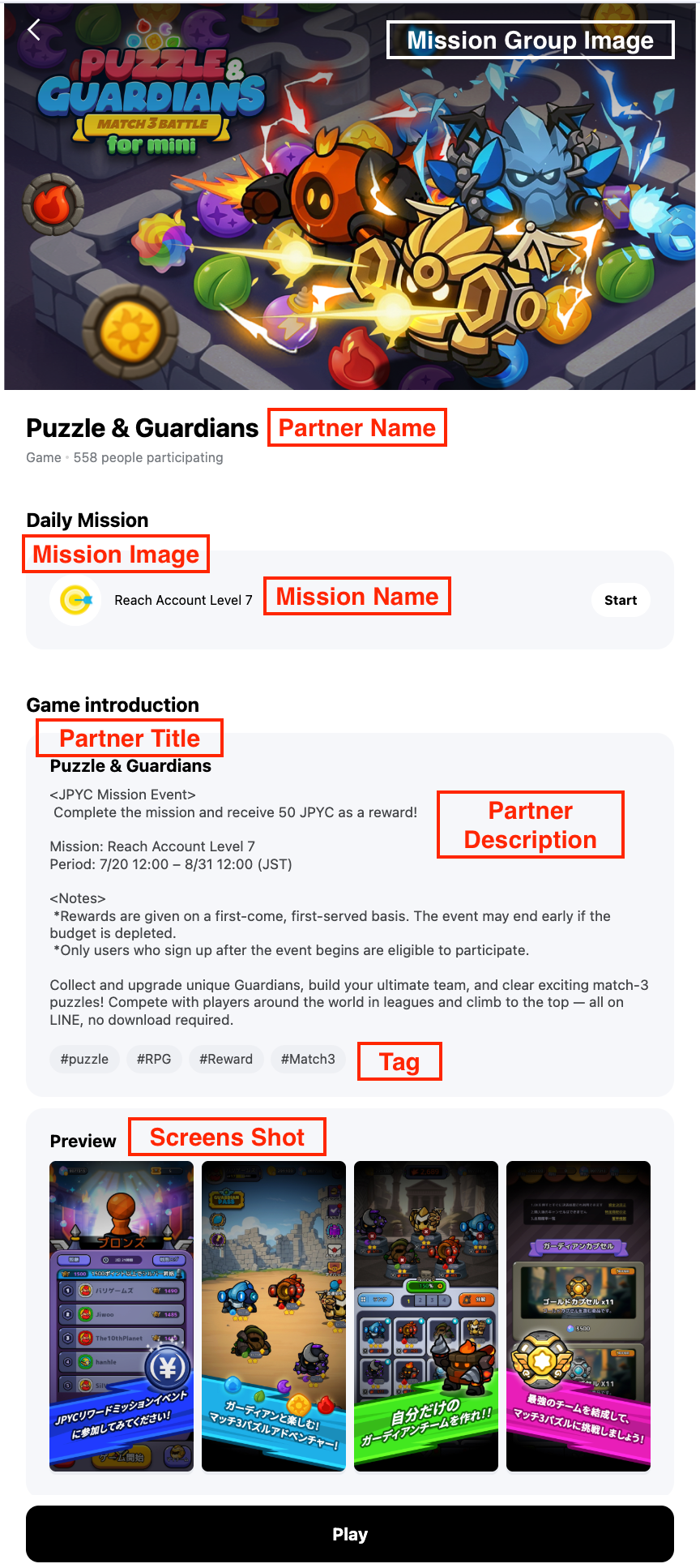
Please refer to the annotated screen below for where each of these items is exposed to users.
Mission Group (Service Matching) Basic Information
- Multilingual Title & Introduction: Title and intro text to be displayed in the Unifi app mission list. Must provide in 5 languages (EN, KR, JA, TH, TW).
- Main Banner Image: 1 image of 1280 × 720 pixels. Shown when a user enters the Mission page.
- Service ID to Match: The unique identifier of your service to be linked with this mission group.
- Mission Exposure Method: Currently operates as an 'All Exposure (List form)' method, displaying all registered missions at once. (Automatically selected as 'All Exposure' for Single Missions).
- Final Clear Condition: Set the target number of individual missions within the group that must be completed to consider the entire group achieved. (Automatically set to 1 for Single Missions).
- Mission Notice (Optional): A multilingual notice for the mission group, shown on the App Detail Page (e.g. "Rewards for this mission are available only to users in Japan"). If nothing is written, no notice text is shown.
Individual Mission Details & Mission Key Issuance Method
Each individual mission registered in Unifi has a Mission Key for API identification. You can choose from the two methods below according to your development convenience.
- Unifi Random Generation: Unifi system generates random alphanumeric keys and delivers them to you.
- Partner's Existing ID Mapping: Provide the existing Mission/Achievement ID (Mission ID) managed by your service server, and we will register it directly as the Mission Key in the Unifi system. This improves development convenience as you do not need to manage separate mapping values.
No Duplicate Mission Key Policy
Regardless of the generation method or partner ID registration, Mission Keys must never be duplicated within the same service (Service ID).
The Mission Key must be shared with Unifi in advance for mission completion data to be received — rewards are only processed once completion data arrives under a shared key. See Achieve Mission for the API used to report completion.
- Mission Type Name: A unique English keyword indicating the nature of the mission (e.g., PLAY, ACHIEVE_LEVEL).
- Multilingual Mission Name: The actual mission target text exposed to users. Must provide in 5 languages (EN, KR, JA, TH, TW).
- Mission Thumbnail Image (Optional): 400 × 400 pixels (replaced with default image if not provided).
- Mission Link (Entry URL): Your service URL to navigate to when a user clicks the mission in the Unifi app. Please prepare a URL for each access environment (LIFF / Web / Mini) — if there is no URL for a given environment, the mission will not be shown in that environment.
Reward Configuration
Reward Methods
MINI Partners choose one of the two methods below.
| Method | Description | Setting Unit |
|---|---|---|
Fixed (FIXED) | Pays the set JPYC amount as-is when a mission is completed. | Reward amount |
Lucky Draw (LUCKY_DRAW) | Gives a draw ticket when a mission is completed, and the user draws to receive a reward that varies. | Number of draw tickets |
- Reward Unit: Choose between providing rewards upon Individual Mission Clear / Mission Group Clear.
Setting the Budget and Reward Amounts
- The total mission budget is discussed together up to 2 weeks before the mission starts. If you run several missions, the agreed total budget can be split between them.
- Individual reward amounts are set differently depending on the method:
- Fixed: the amount paid out per completion.
- Lucky Draw: the number of draw tickets given.
- The maximum reward per user is optional, and can be set for both Fixed and Lucky Draw. If it is not set, there is no limit.
- For Lucky Draw, the reward amount for each prize tier and the number of winners (the win-probability structure) have to be defined along with the total budget, so please agree these with the Unifi business team in advance.
When the Budget Is Fully Used
Once the reward budget is fully used or the limit you set is reached, the mission or Mission Group linked to that reward closes automatically. Depending on how things go, it may close earlier than planned.
Operational Checklist
Please keep the following in mind while the mission is live.
- Register Partner information in advance: Partner information is shown together on the mission page, so it has to be registered before the mission is set up.
- Share the Mission Key in advance: if it is not shared beforehand, completion data cannot be matched to the mission, so no reward is paid.
- Avoid duplicate rewards on one-time missions: a one-time mission pays the reward only once, even if completion data is received several times. If a reward needs to be given repeatedly, please discuss it with the Unifi representative in advance.
- Mission start and end times: these can be set down to the minute.
For questions about technical integration, such as the Mission Achievement API, please follow the guidance in API Specifications.