Mission & Reward Integration Guide
This guide covers the entire integration process for missions, reward distribution, and user mapping between Unifi Mini and your service within the LINE Mini App environment.
Unifi Mission & Reward displays missions created by a Partner on Unifi, and when a user completes one of those missions, the reward is paid out directly from the Unifi central reward wallet. The Partner does not send rewards itself — the Partner's part of the integration is creating the mission and reporting completion data to Unifi.
Mission Structure & Basic Policy
Missions in the Unifi system are managed in a hierarchical structure of Mission Group > Individual Mission.
- Mission Group: A set of missions grouped together for a specific purpose. Each Mission Group is mapped to a single partner (Partner ID). Multiple Individual Missions can be created and operated under a single Mission Group.
- Individual Mission: The specific task a user must complete (e.g., reaching a certain level, making a purchase above a certain amount).
- Reset Time: Applies to Daily missions only. The mission reset time is configured and operated based on a time designated in advance through prior consultation with Unifi.
Mission Types
| Type | Description |
|---|---|
Daily (DAILY) | Users can take part again every day. Once the Reset Hour you set has passed, progress returns to its starting state. Even if the reward has not been claimed yet, it can no longer be claimed after the Reset Hour. The Reset Hour is based on JST (Japan Standard Time). |
One-time (ONE_TIME) | Users can take part and complete the mission only once during the operating period. It stays open until the end time, and cannot be joined after it closes. |
Mission Structure: Single Mission vs. Mission Group
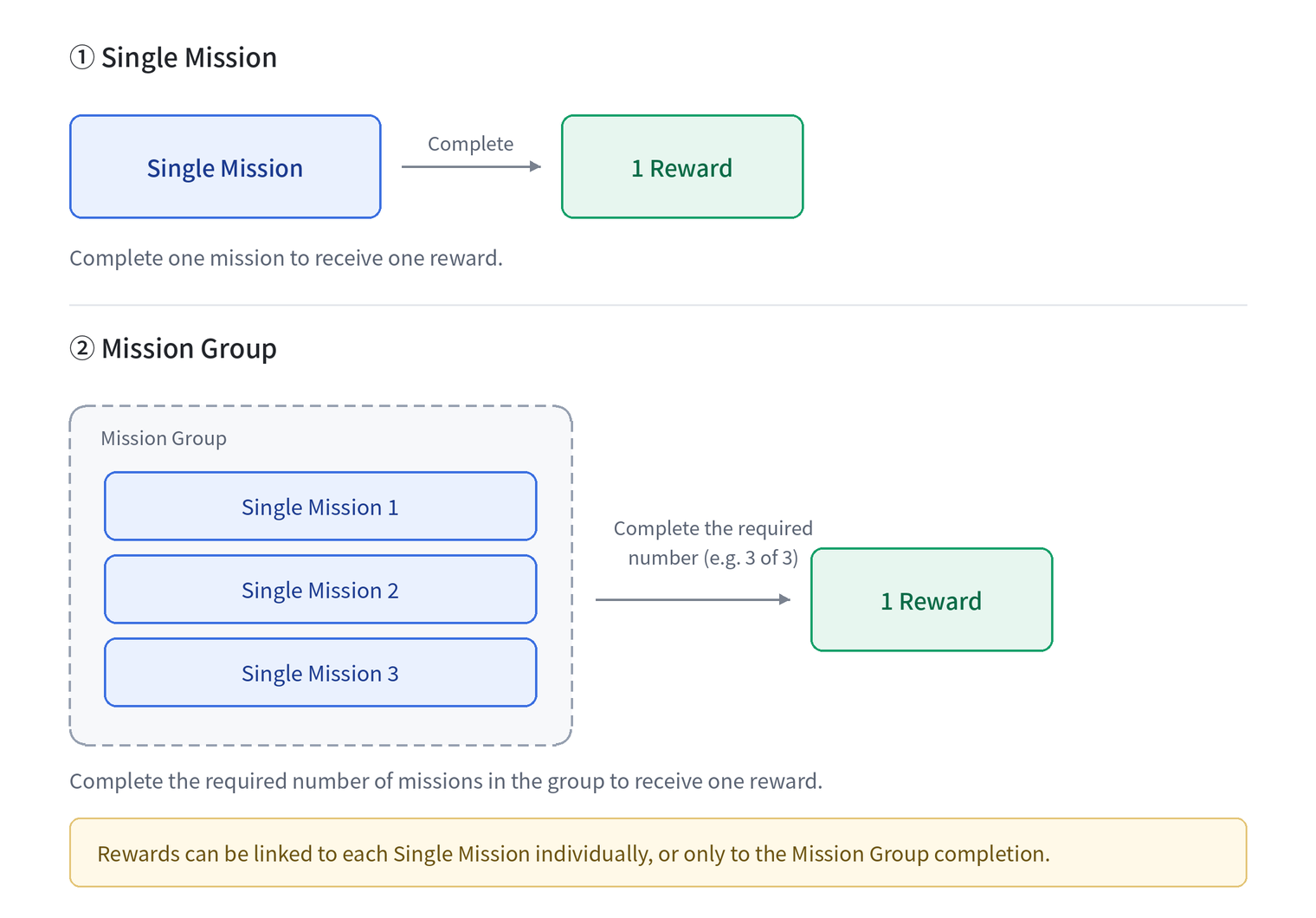
A mission can be built as a Single Mission or as a Mission Group.
- Single Mission: Completing 1 mission gives 1 reward.
- Mission Group: Several Single Missions are bundled together, and completing the set number of them (for example, 3 of 3) gives 1 reward.
- One group can hold several Single Missions.
- Rewards can be linked to each Single Mission individually, or only to the Mission Group completion.
If you plan to run a Mission Group, please discuss the structure with the Unifi representative in advance.
Service Publisher Integration Sequence (To-Do List)
For a successful system integration, please proceed with the tasks in the following order.
| Phase | Assigned Team | Task (To-Do) |
|---|---|---|
| Step 1 Preparation | Infra / Backend |
|
| Step 2 Planning Info | Biz / PM |
|
| Step 3 User Mapping | Frontend / Backend |
|
| Step 4 Mission Achieve | Backend |
|